 Desktop
Desktop streaming
View a Windows computer's desktop using the DesktopBee app or browser viewer.
Explore the desktop connection tools available today, plus the capabilities still being developed.
A DIFFERENT WAY TO CONNECT
Install DesktopBee on the Windows host. On the viewing device, just open our web viewer, enter the host's ID and current code, and request approval. Choose between View Only and Full Control based on the host's permission.
Designed for remote assistance, support and accessing your own Windows PC when someone is available to approve.
View a Windows computer's desktop using the DesktopBee app or browser viewer.
Connect without installing a Windows viewer; the Windows host still runs DesktopBee.
The person at the host chooses what access to grant. Input can be restricted by the relay.
Recognize a computer without regenerating its identity every application launch.
Connections to the relay are TLS-protected. End-to-end encryption is not implemented yet.
Integrated session chat and basic annotations in the early preview.
Connection alerts, live activity, session duration and visible disconnect controls.
Privacy-conscious local troubleshooting and connection health checks.
A responsive Windows workspace with readable forms, accessible scrollbars and tooltips.
DesktopBee puts the host Device ID and one-time access code next to the remote connection form. The real application screenshot illustrates the workflow, with the private ID masked for public display.
Get Windows download →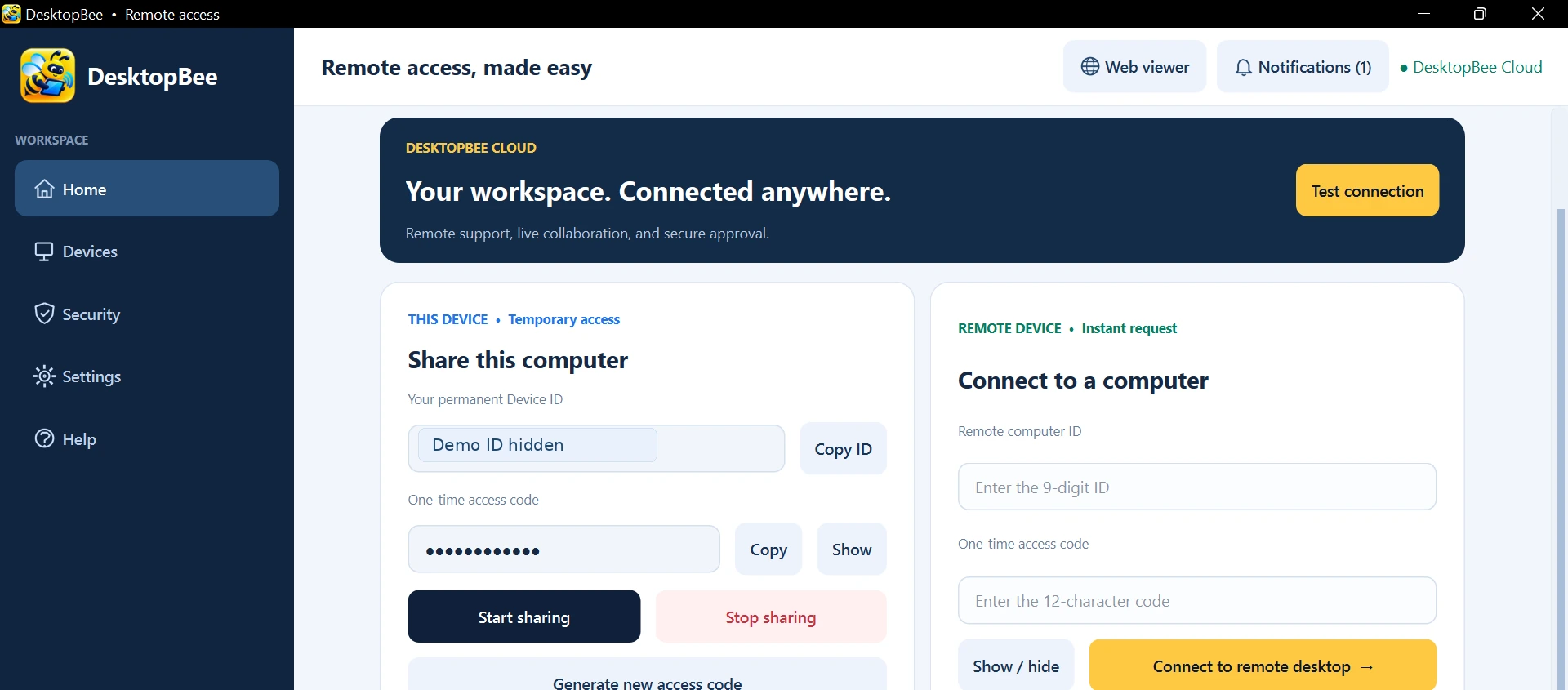
Not every feature seen in large commercial remote-desktop platforms is available in this preview. We're building a more secure release in phases, with measured testing between them.
Try DesktopBee Free with host approval and browser viewing. The download center always displays the current published release status.